
How Sora 2 Video Generator Improves Marketing Efficiency: Faster Short-Video Production
How Sora 2 Video Generator Improves Marketing Efficiency: Faster Short-Video Production
If your marketing team needs more short videos, faster turnaround, and less manual production work, the key question is simple: can Sora 2 help you create better video content with fewer bottlenecks? This article explains how a Sora-style video generator can fit into a marketing workflow, where it helps most, and how to decide between sora api pro vs sora2 when planning production.
1) Why Sora 2 matters for marketing teams
Conclusion: Sora 2-style video generation is most valuable when you need to turn ideas into short-form videos quickly, without building every asset from scratch.
Marketing teams often face repeated production tasks:
- turning campaign copy into video concepts
- adapting one message into multiple formats
- creating variations for different channels
- keeping pace with frequent content demands
A unified video generation API can reduce the friction in these steps by supporting:
- text-to-video generation from prompts
- image-to-video generation from reference frames
- realistic motion and synchronized audio
- camera and style control for more directed outputs
This is especially useful for short-form marketing content, where speed and iteration often matter more than complex post-production.
Actionable advice:
- Use AI video generation for concept tests, product teasers, social posts, and internal mockups.
- Keep a library of approved prompts and visual directions so your team can reuse them across campaigns.
- Treat generated video as a fast production layer, not a replacement for your entire creative process.
2) Where short-video production gains efficiency
Conclusion: The biggest efficiency gains come from reducing handoffs, shortening revision cycles, and reusing creative direction across multiple outputs.
With a production-ready API, teams can move from idea to render in a more structured way:
- Write a prompt or upload a reference image
- Select the model, aspect ratio, and creative direction
- Submit the request through the API
- Track generation status
- Retrieve the final video when ready
That workflow helps marketing teams avoid several common delays:
- waiting for manual motion design
- re-creating visuals for each format
- re-editing sequences for multiple platforms
- coordinating between copy, design, and video teams
A useful feature for content ops is multi-shot storytelling. It allows a prompt to describe more than one scene while maintaining coherence across cuts and transitions. For marketing, that means one campaign idea can be structured into a more complete short video without rebuilding every scene separately.

Practical use cases
| Marketing use case | How Sora 2-style generation helps | Operational benefit |
|---|---|---|
| Social media teasers | Generate quick visual variants from prompts | Faster testing and iteration |
| Product highlights | Animate reference images into motion scenes | Less manual editing work |
| Campaign storyboards | Describe multi-shot sequences in one request | Better consistency across scenes |
| Brand explainers | Add synchronized audio and visual flow | More complete draft outputs |
| Localization prep | Reuse core visuals with new copy directions | Easier content adaptation |
Actionable advice:
- Standardize aspect ratios for each channel before generation.
- Build prompt templates for recurring formats like launches, promos, and feature spotlights.
- Use reference images when you need brand consistency from one asset to another.
3) sora api pro vs sora2: how to choose for marketing workflows
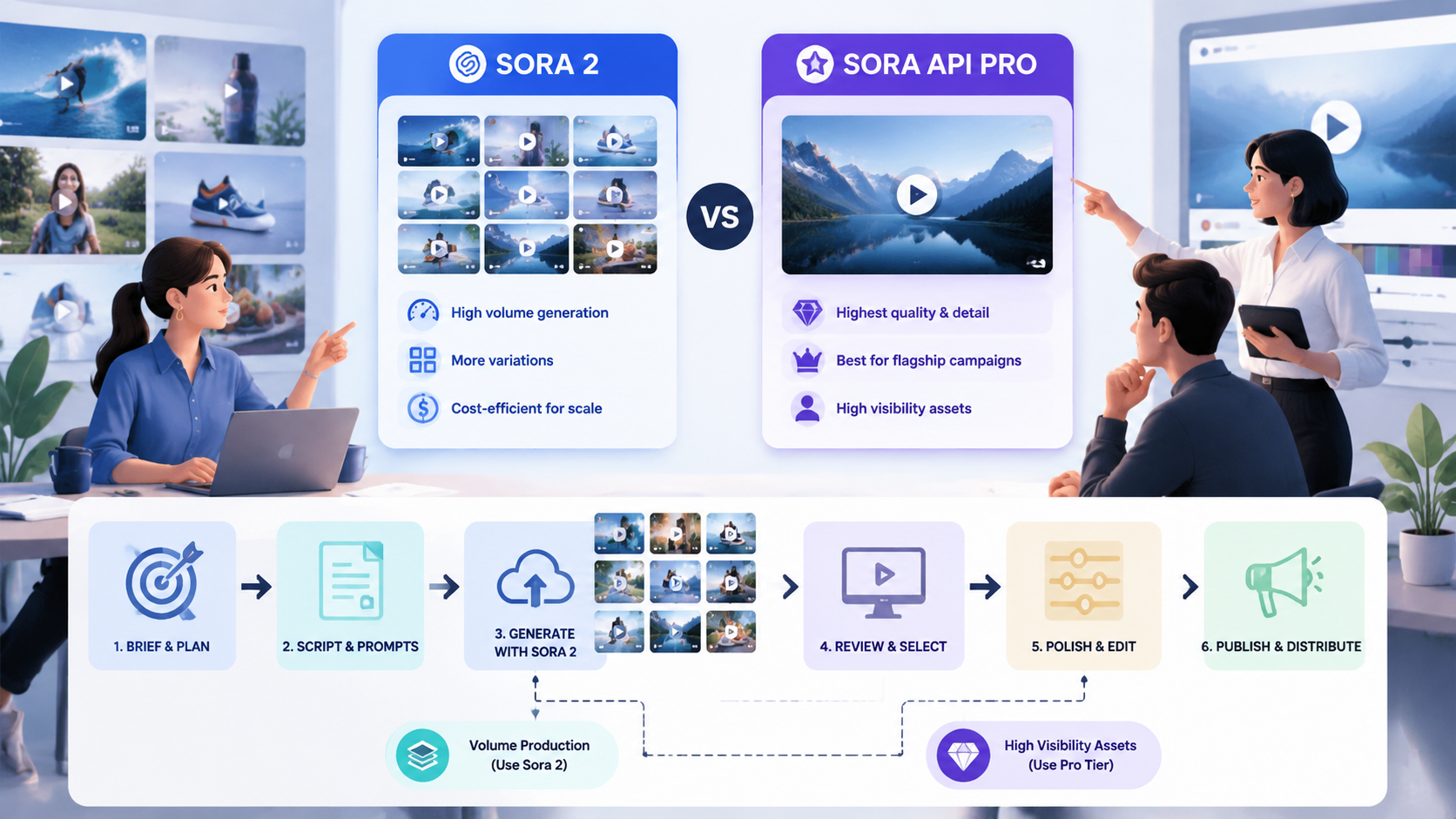
Conclusion: The choice between sora api pro vs sora2 depends on whether you prioritize higher-fidelity output or broader, faster production use.
Based on the available feature set, a Sora 2 API workflow supports multiple needs:
- standard text-to-video generation
- image-to-video generation
- camera and framing control
- synchronized audio
- multi-shot sequences
- production-ready REST integration
A Pro tier is positioned for cases where higher fidelity is needed. That makes sense when a campaign requires a more polished result, tighter visual refinement, or more demanding creative expectations. For routine marketing content, the base Sora 2 workflow may be enough.
Simple decision guide
-
Choose Sora 2 when you need:
- fast short-video output
- prompt-driven production
- reusable workflows for campaigns
- efficient batch generation for content ops
-
Choose Sora 2 Pro when you need:
- higher-fidelity outputs
- more premium visual presentation
- stronger creative polish for key assets
- a model tier suited to important marketing deliverables
If your team is comparing sora api pro vs sora2, the practical question is not just quality. It is also about workflow fit: how often you generate, how much variation you need, and how much polish each asset requires.
Actionable advice:
- Use Sora 2 for volume-oriented marketing production.
- Reserve Pro-tier usage for high-visibility assets or flagship campaigns.
- Define quality thresholds in advance so your team knows when to upgrade the model tier.
4) How to integrate Sora 2 into a marketing production pipeline
Conclusion: The best results come from using Sora 2 as part of a repeatable pipeline, not as an isolated creative tool.
A production-ready API makes it easier to connect video generation to your existing content workflow. Tikdek’s unified API model supports:
- API key creation
- prompt or image submission
- job status tracking
- result retrieval
- quota and batching support
That means teams can design a process around campaign planning instead of one-off manual creation. For example, a content team could prepare prompt sets for each campaign theme, generate multiple variants, review outputs, and then publish the best version.
Recommended pipeline structure
- Briefing
- Define the campaign goal, audience, and platform.
- Creative setup
- Prepare prompts, reference frames, and visual direction.
- Generation
- Submit requests with the chosen model and aspect ratio.
- Review
- Check motion, coherence, audio sync, and brand fit.
- Distribution
- Export or deliver the final video to publishing workflows.
Actionable advice:
- Keep prompts concise but specific about motion, mood, and scene progression.
- Use aspect ratio settings that match your target channel.
- Track which prompt structures perform best for speed and output quality.
5) Cost and production planning considerations
Conclusion: Short-video efficiency is not only about speed; it is also about controlling usage, formats, and generation volume.
The reference API includes a configurable video generation model with:
- Sora2-10s
- 16:9 landscape
- 100 credits per generation
For marketing teams, this means planning matters. If your campaign requires multiple variants, you should decide early which assets deserve generation attempts and which ones should be reserved for final delivery. A structured approval process can prevent unnecessary re-renders.
Planning tips
- Use generated videos first for draft concepts and A/B exploration.
- Limit unnecessary revisions by approving the script and visual direction before generation.
- Group related requests together when batching is available.
- Align credits usage with campaign priority rather than generating everything equally.

Actionable advice:
- Create a usage policy for routine, experimental, and premium outputs.
- Define which campaigns qualify for Pro-tier generation.
- Review generation outputs in batches to reduce scattered revision cycles.
FAQ
What is Sora 2 video generation used for in marketing?
It is used to turn prompts or reference images into short videos for campaigns, social media, product highlights, and concept testing.
Is Sora 2 better for speed or quality?
It can support both, but it is especially useful for speeding up short-video production and reducing manual work. Pro-tier options are more suitable when higher fidelity is needed.
What does sora api pro vs sora2 mean in practice?
In practice, it is a choice between a higher-fidelity tier and a more general production workflow. If you need polished outputs for important assets, Pro may be the better fit. If you need efficient generation at scale, Sora 2 may be enough.
Can Sora 2 generate audio too?
Yes. The reference feature set includes synchronized audio, including dialogue, sound effects, and ambience aligned with the visuals.
Can it handle multi-scene marketing videos?
Yes. Multi-shot storytelling is supported, which helps keep scene context coherent across cuts and transitions.
Summary
Sora 2-style video generation can improve marketing efficiency by reducing manual production work, accelerating iteration, and making it easier to create short videos at scale. For content teams, the main value comes from text-to-video, image-to-video, synchronized audio, and multi-shot support within a unified API workflow.
If you are comparing sora api pro vs sora2, the right choice depends on your content goals: use Sora 2 for fast, repeatable production, and consider Pro-tier output when a campaign needs higher fidelity. The most effective setup is a clear workflow with defined prompts, target formats, and review rules.