
Sora 2 AI Video Generator Practical Guide: How to Generate High-Quality Videos Efficiently
Sora 2 AI Video Generator Practical Guide: How to Generate High-Quality Videos Efficiently
If you want to create realistic AI videos faster, with better motion, synced audio, and more control over the final result, a sora 2 ai video generator workflow can help. This guide explains how to use a Sora-style video generation API effectively, what settings matter most, and how to structure prompts for more reliable output.
1) Start with the Right Generation Mode
Conclusion: Choose text-to-video when you want full creative control from a written prompt, and image-to-video when you already have a reference visual and want to animate it.
Why this matters:
A Sora 2-style generator supports both workflows. Text-to-video is useful for scenes built from scratch, while image-to-video helps preserve composition, character appearance, and visual consistency. If your goal is efficient production, picking the right mode early reduces retries and wasted generations.
Actionable advice:
- Use text-to-video for concept exploration, ads, trailers, or abstract scenes.
- Use image-to-video when you need the output to stay close to an existing design, product shot, or storyboard frame.
- Keep prompts focused on one scene objective per generation whenever possible.
- If consistency is critical, start from a strong reference image rather than describing everything from scratch.
2) Write Prompts That Guide Motion, Camera, and Style
Conclusion: High-quality output depends on prompt clarity. The more clearly you define motion, camera direction, and style, the more controllable the result becomes.
Why this matters:
Sora-style video generation is designed for realistic motion and cinematic direction. That means prompts should do more than describe what is visible; they should also describe how the scene moves and how the camera behaves. For example, mentioning framing, movement, and atmosphere can help the model produce more coherent results.
Actionable advice:
- Specify the subject, setting, and action.
- Add camera direction such as static shot, slow push-in, or wide landscape framing.
- Mention the desired visual style or tone, such as cinematic, realistic, or documentary-like.
- If audio matters, describe sound cues or dialogue in the prompt when supported.
- Avoid overly crowded prompts with too many competing actions in one shot.
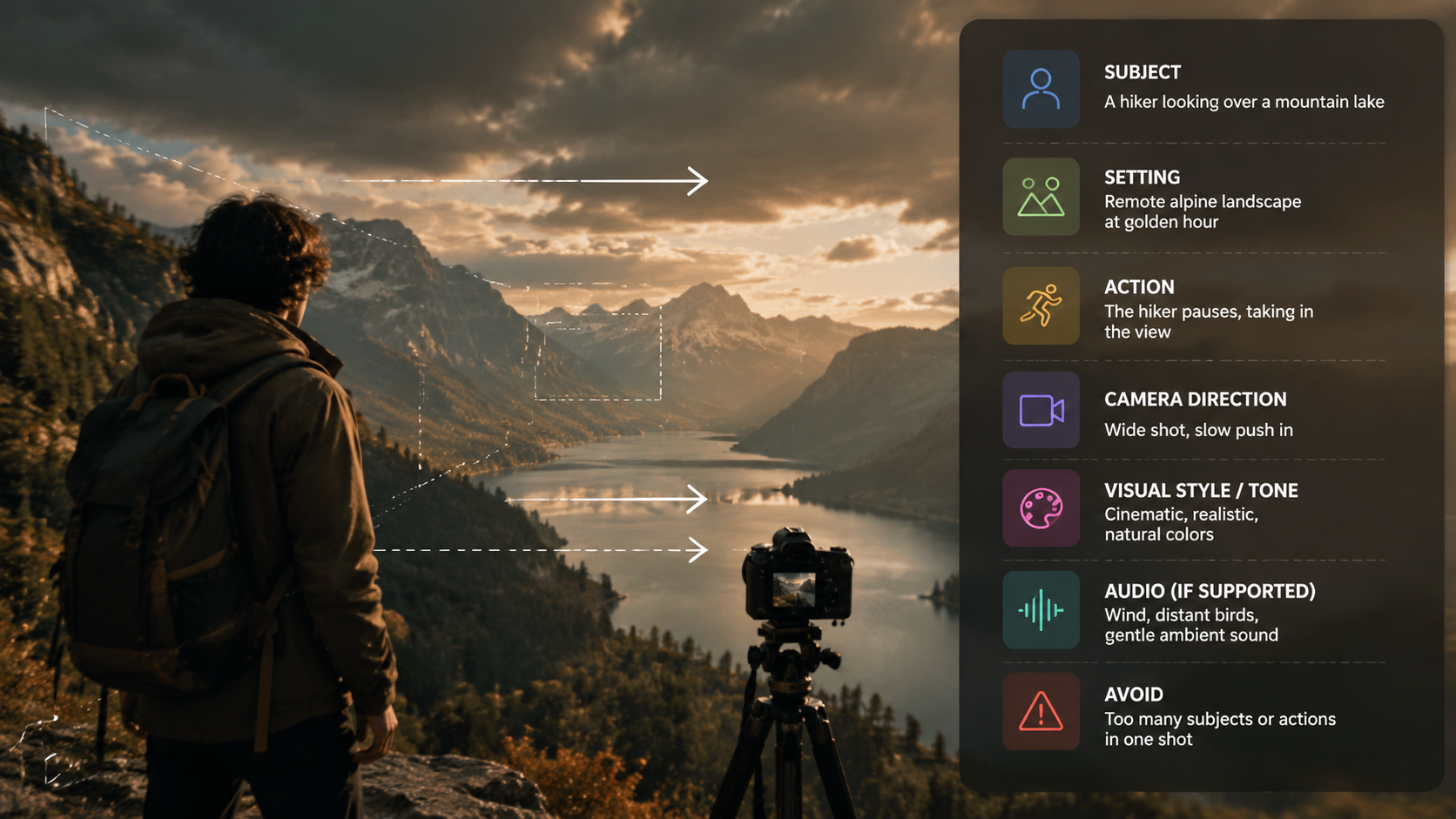
Prompt structure you can reuse
| Prompt Element | What to Include | Why It Helps |
|---|---|---|
| Subject | Who or what appears in the scene | Keeps the main focus clear |
| Action | What the subject is doing | Improves motion generation |
| Camera | Framing and movement | Gives the model stronger direction |
| Style | Cinematic, realistic, clean, etc. | Aligns the visual tone |
| Audio | Dialogue, ambience, SFX | Supports synced audio output |
3) Control Output Quality with Model, Aspect Ratio, and Scene Scope
Conclusion: Efficiency is not only about generating faster; it is also about setting the right configuration so the result matches your use case on the first few tries.
Why this matters:
A Sora 2 video generation API typically exposes configuration such as model selection and aspect ratio. In the reference setup, one available model is Sora2-10s, and the supported format includes 16:9 landscape. These settings can strongly affect how the final video fits your publishing needs.
Actionable advice:
- Use the model tier that matches your quality requirement.
- Choose 16:9 landscape for standard web, YouTube, and presentation use cases.
- Keep the scene duration and complexity aligned with the model’s strengths.
- For multi-shot storytelling, define transitions clearly so the model can preserve context across cuts.
- If the project needs a higher-fidelity output, consider a higher tier such as Sora 2 Pro when available.
4) Build a Reliable Production Workflow
Conclusion: The fastest way to generate consistently good videos is to treat video generation as a repeatable workflow, not a one-off prompt test.
Why this matters:
The reference API workflow is straightforward: create an API key, send prompts or reference images, track generation status, and fetch results when ready. This makes it practical for production use, especially when you need to scale beyond manual experimentation.
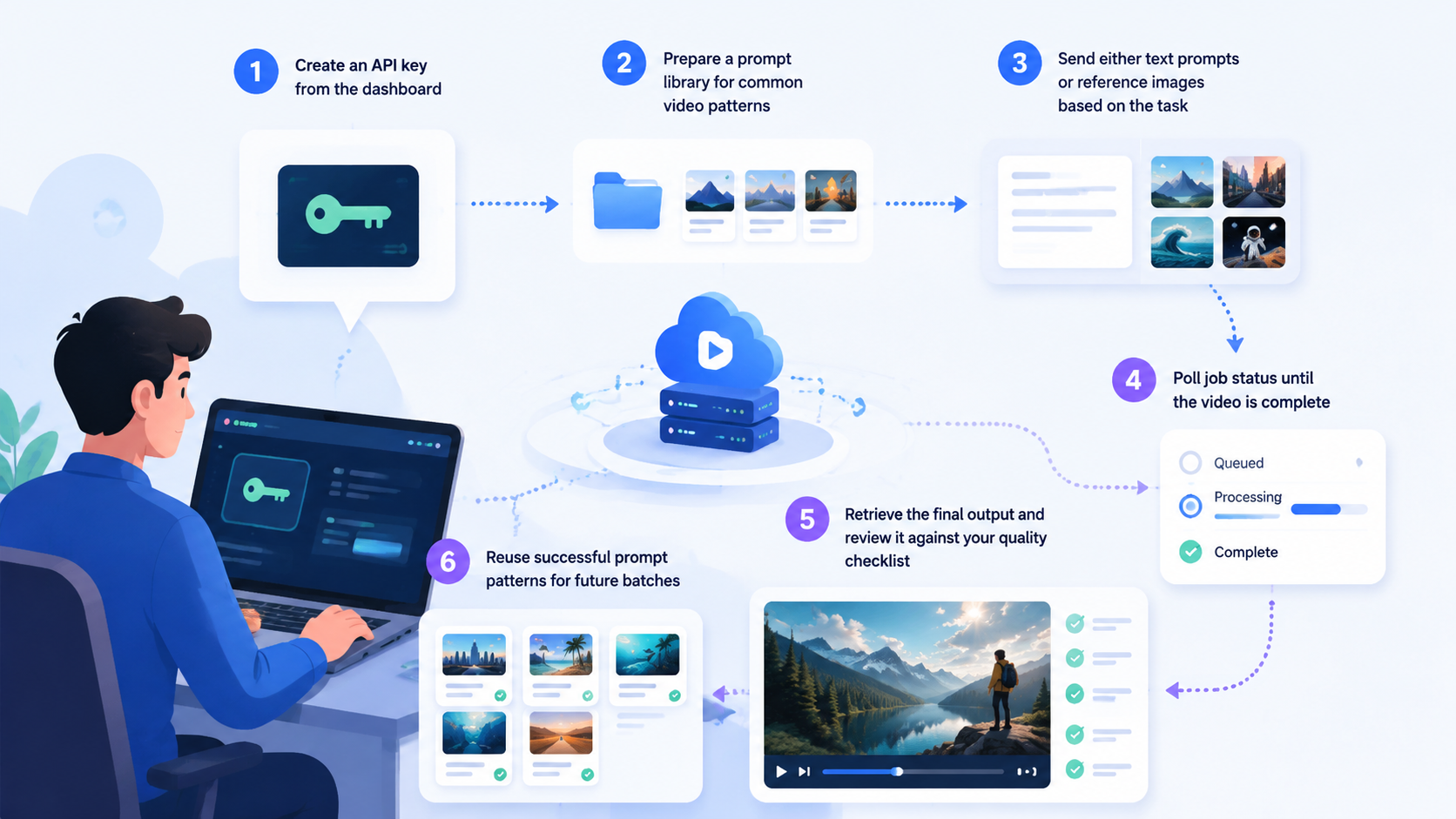
Actionable advice:
- Create an API key from the dashboard.
- Prepare a prompt library for common video patterns.
- Send either text prompts or reference images based on the task.
- Poll job status until the video is complete.
- Retrieve the final output and review it against your quality checklist.
- Reuse successful prompt patterns for future batches.
A simple operational checklist
- Is the scene goal clear?
- Is the prompt specific enough about motion?
- Is the aspect ratio correct for the destination?
- Does the scene need image-to-video instead of text-to-video?
- Does the output require synced audio?
- Is the multi-shot structure easy to follow?
5) Plan for Scale, Cost, and Consistency
Conclusion: To use a sora 2 ai video generator efficiently at scale, you need a system for batching, reviewing, and managing costs.
Why this matters:
The reference implementation notes a cost per generation and supports quotas and batching for production workloads. Even without relying on large-scale volume, it is important to understand how generation usage maps to your workflow so you can plan revisions efficiently.
Actionable advice:
- Batch similar requests together to reduce repeated setup work.
- Use clear prompt templates to improve consistency across generations.
- Review outputs in stages: first for composition, then motion, then audio.
- Reserve higher-tier generation for shots that truly need extra fidelity.
- Track which prompts produce the best results so you can reuse them later.
FAQ
What is a Sora 2 AI video generator?
It is a video generation workflow or API built around Sora-style models that can create videos from text prompts or reference images, often with realistic motion and synchronized audio.
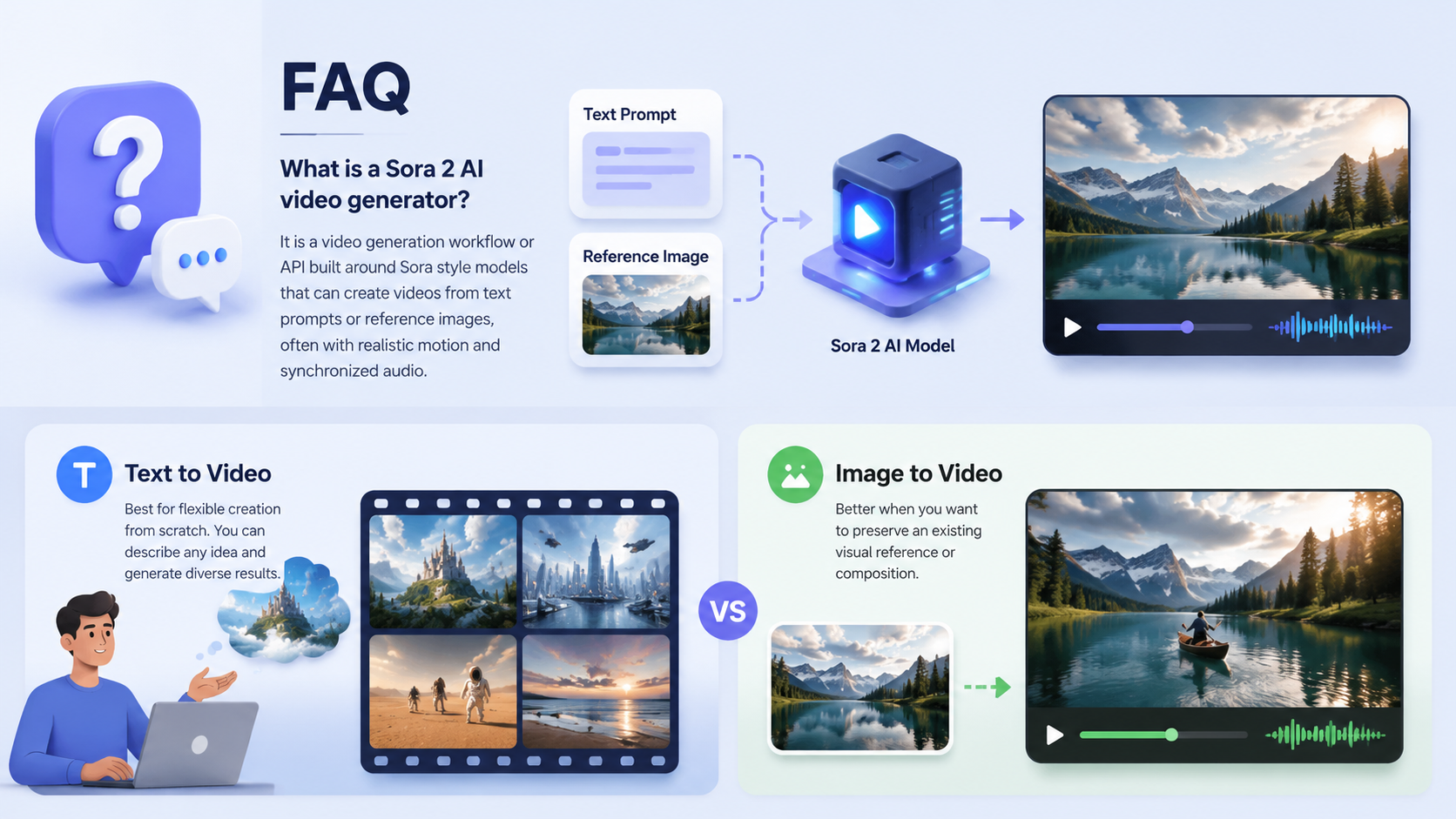
Is text-to-video better than image-to-video?
Neither is universally better. Text-to-video is best for flexible creation from scratch, while image-to-video is better when you want to preserve an existing visual reference or composition.
How do I get better results from a Sora 2-style generator?
Use clearer prompts, define subject/action/camera/style, choose the correct aspect ratio, and keep each generation focused on one scene goal.
Can I create multi-shot videos?
Yes, multi-shot storytelling is supported in the reference feature set. The key is to describe scene transitions and maintain a coherent context across cuts.
Does it support synced audio?
Yes, the reference features mention synchronized audio, including dialogue, sound effects, and ambience aligned with the visuals.
Summary
A sora 2 ai video generator is most effective when you treat it as a structured creative workflow. Start by choosing the right mode, then write prompts that clearly define motion and camera direction, configure the model and aspect ratio correctly, and use a repeatable production process for consistency. If you need scalable, realistic AI video generation, this approach helps you create better outputs with less trial and error.